> ## Documentation Index
> Fetch the complete documentation index at: https://docs.x.com/llms.txt
> Use this file to discover all available pages before exploring further.
# Explore a user's Posts and mentions with the X API v2
> The user Post timeline and user mention timeline endpoints allow developers to retrieve the public Posts composed by, or mentioning a user.
## Introduction
While the [recent search endpoint](/x-api/posts/search/introduction) allows you to only get Posts published in the last 7 days, the user Post timeline and user mention timeline endpoints allow you to retrieve Posts and mentions that are older than the last 7 days, for an authorized user (using the user ID). Developers can use these endpoints to study topics, entities and sentiment of Posts from a user’s timeline or mentions. In this tutorial, we will show you how to explore a user’s Posts and mentions using the user Tweet timeline and user mention timeline endpoints.
## Prerequisites
* In order to use the user Tweet timeline and user mention timeline endpoints, you will need to have a valid developer account.
* You will also need a [Project](/resources/fundamentals/developer-apps) created.
* You must have [signed up](https://developer.x.com/en/portal/petition/essential/basic-info) for a developer account, and have activated the [new Developer Console experience](https://developer.x.com/en/portal/opt-in.html).
* Access is available with active keys and tokens for a developer App that is attached to a [Project](/resources/fundamentals/developer-apps) created in the [Developer Console](/resources/fundamentals/developer-portal).
* A Bearer Token from your App in the [X Developer Console](/resources/fundamentals/developer-portal).
* If you do not have an approved developer account, you can [apply for one](https://developer.x.com/en/apply-for-access).
## Approved developer account
If you do not have one yet, you can [apply for one](https://developer.x.com/en/apply-for-access).
## Create a Project and connect an App
In the [Developer Console](https://developer.x.com/en/portal/dashboard), click create a new App.
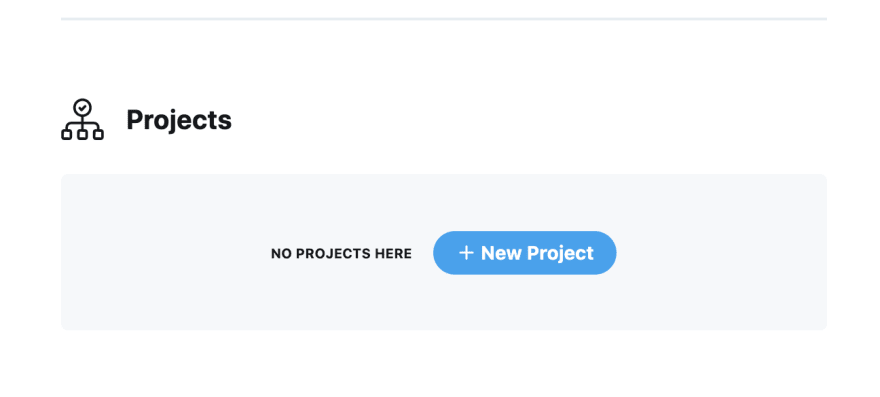 Give it a name, select the appropriate use-case, and provide a Project description. Next, you can either create a new App, or connect an existing [App](/resources/fundamentals/developer-apps) (an App is a container for your API keys that you need in order to make an HTTP request to the X API).
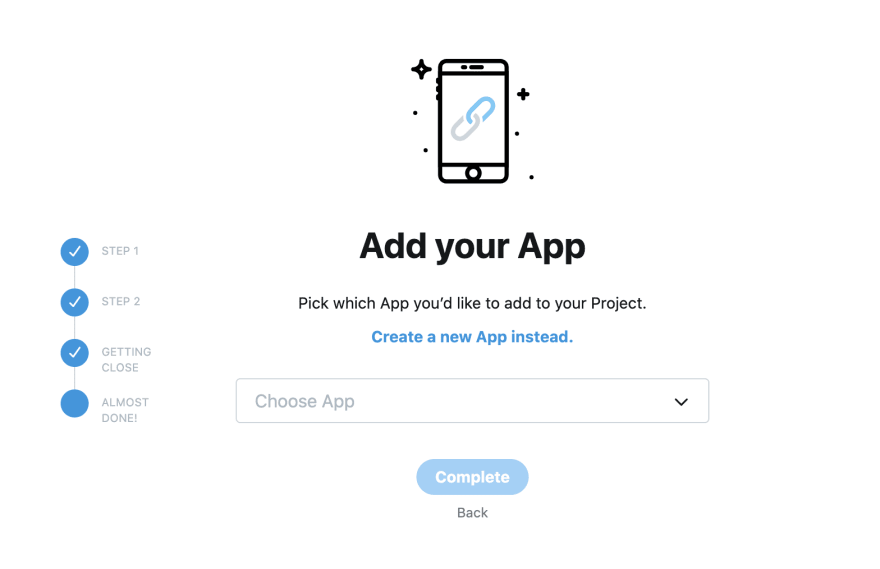 Click ‘create a new App instead’ and give your App a name in order to create a new App.
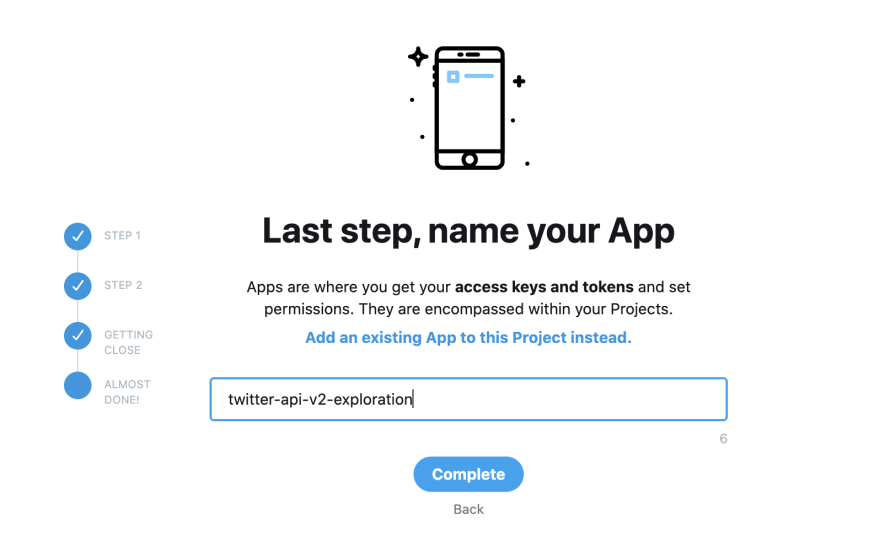 Once you click complete, you will get your API keys and the bearer token that you can then use to connect to the new endpoints in the X API v2.
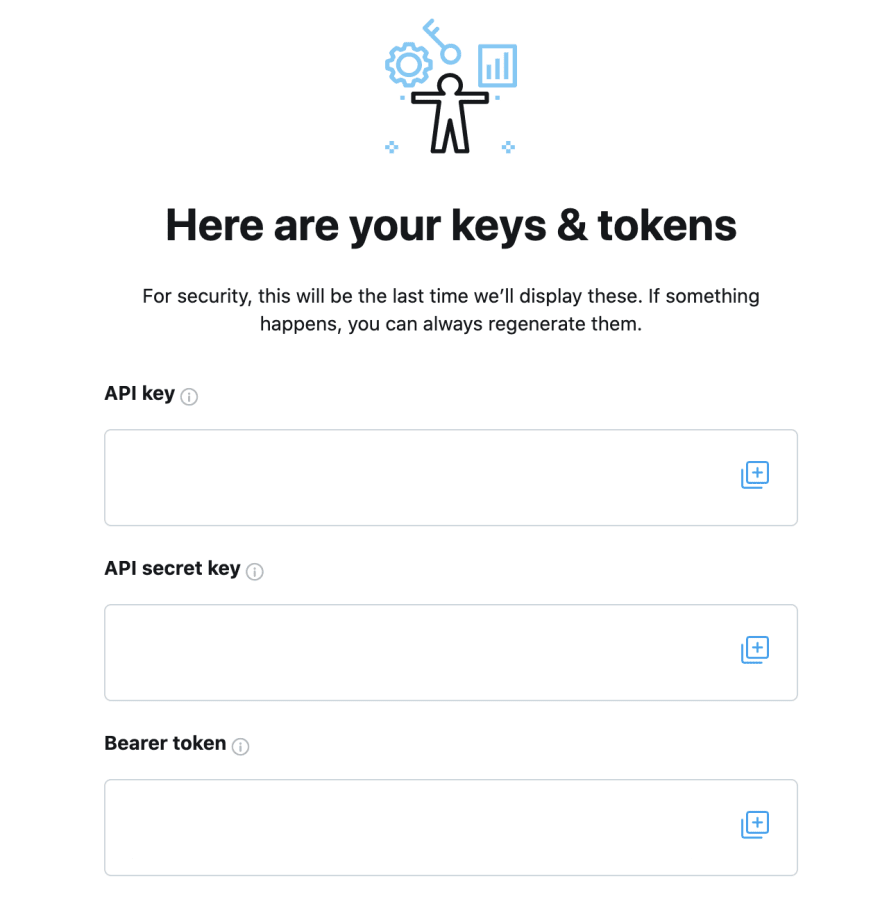 Click the (+) next to API key, API secret key and Bearer token and copy these values to a safe place on your local machine. You will need these to make the API calls in the next step.
Note: The keys in the screenshot above are hidden, but in your own Developer Console, you will be able to see the actual values for the API key, API secret key and Bearer token.
## How to get the user ID for a user to use in the user Tweet timeline and user mention timeline endpoints
The user Tweet timeline and user mention timeline endpoints allow you to get Posts using the user ID. In order to get the user ID from a username, you can use the new [user lookup endpoint v2](/x-api/users/lookup/quickstart/user-lookup). Replace the USER\_NAME with the username of your choice and XXXX with your own bearer token that you obtained above
```bash theme={null}
curl --request GET 'https://api.x.com/2/users/by/username/USER_NAME --header 'Authorization: Bearer XXXXXX'
```
You will see the user ID in response as shown below:
```json theme={null}
{
"data": {
"id": "2244994945",
"name": "Developers",
"username": "XDevelopers"
}
}
```
## Connecting to the user Tweet timeline and user mention timeline endpoints
In order to get the user Tweet timeline for a user, run the following curl command in your terminal (make sure to replace the USER\_ID with the user ID of your choice and XXXX with your own bearer token that you obtained above)
```bash theme={null}
curl --request GET 'https://api.x.com/2/users/USER_ID/tweets' --header 'Authorization: Bearer XXXXXX'
```
You will see that the JSON response for these requests contains the ID and text for the Posts by default (example below).
```yaml theme={null}
{
"id": "1334200897081987072",
"text": "👀 If you are new to the X API v2, check out this step-by-step guide to making your first request https://t.co/4rZqThpSbp"
}
```
If you want additional fields returned as part of the response (such as user information, additional Tweet fields such as context annotations etc.) then you will need to specify those fields explicitly in your response. Learn how to do this from the [guide on using fields and expansions](/x-api/fundamentals/data-dictionary/reference#how-to-use-fields-and-expansions).
You can also get these Posts using programming languages of your choice. Check out our sample code in Python, Node (JavaScript), Java and Ruby for the user Tweet timeline and user mention timeline endpoints on our [Github repository](https://github.com/xdevplatform/Twitter-API-v2-sample-code).
## Exploring the user’s Posts
Once you know how to get Posts using the user Tweet timeline and user mention timeline endpoints, you can start to explore their Posts. For example, if you wanted to identify common named entities present in a user’s mentions, you can do the following:
In the API request, specify that you want the context\_annotations object returned in the Tweet responses:
```bash theme={null}
curl --request GET 'https://api.x.com/2/users/USER_ID/mentions?tweet.fields=context_annotations' --header 'Authorization: Bearer XXXXXX'
```
In the response, you will see if any named entities are present in the mentions. Here is an example:
```json theme={null}
{
"domain": {
"id": "47",
"name": "Brand",
"description": "Brands and Companies"
},
"entity": {
"id": "783214",
"name": "X"
}
}
```
If you wanted to see which popular entities appear in your mentions, you could keep a count of popular entities by parsing each Tweet in the mentions.
If you wanted to explore the preview image URL for all Posts in your timeline that contain media, you can do the following:
In the API request, specify that you want the preview\_image\_url in the tweet.media fields, and the attachments.media\_keys expansions
```bash theme={null}
curl --request GET 'https://api.x.com/2/users/2244994945/mentions?max_results=100&media.fields=preview_image_url&expansions=attachments.media_keys' --header 'Authorization: Bearer XXXXXX'
```
In the response, you will see the preview\_image\_url in the includes object as shown below:
```json theme={null}
{
"includes": {
"media": [
{
"media_key": "16_1334657439640121344",
"preview_image_url": "https://pbs.twimg.com/tweet_video_thumb/EoWn3rqU8AAtFWL.jpg",
"type": "animated_gif"
}
]
}
}
```
Once you have an understanding of how to navigate a user’s Posts, you can also use other APIs and services to do more with the Posts. Below are some resources to keep handy when using the user Tweet timeline and user mention timeline endpoints.
## Resources
* Learn more about the [user Tweet timeline and the user mention timeline endpoints](/x-api/posts/timelines/introduction).
* Check out the [API reference for the user Tweet timeline endpoint](/x-api/users/get-posts) to learn more about what’s available.
* Check out the [API reference for the user mention timeline endpoint](/x-api/users/get-mentions) to learn more about what’s available.
* Get inspired by reading our other [tutorials](/tutorials).
Click the (+) next to API key, API secret key and Bearer token and copy these values to a safe place on your local machine. You will need these to make the API calls in the next step.
Note: The keys in the screenshot above are hidden, but in your own Developer Console, you will be able to see the actual values for the API key, API secret key and Bearer token.
## How to get the user ID for a user to use in the user Tweet timeline and user mention timeline endpoints
The user Tweet timeline and user mention timeline endpoints allow you to get Posts using the user ID. In order to get the user ID from a username, you can use the new [user lookup endpoint v2](/x-api/users/lookup/quickstart/user-lookup). Replace the USER\_NAME with the username of your choice and XXXX with your own bearer token that you obtained above
```bash theme={null}
curl --request GET 'https://api.x.com/2/users/by/username/USER_NAME --header 'Authorization: Bearer XXXXXX'
```
You will see the user ID in response as shown below:
```json theme={null}
{
"data": {
"id": "2244994945",
"name": "Developers",
"username": "XDevelopers"
}
}
```
## Connecting to the user Tweet timeline and user mention timeline endpoints
In order to get the user Tweet timeline for a user, run the following curl command in your terminal (make sure to replace the USER\_ID with the user ID of your choice and XXXX with your own bearer token that you obtained above)
```bash theme={null}
curl --request GET 'https://api.x.com/2/users/USER_ID/tweets' --header 'Authorization: Bearer XXXXXX'
```
You will see that the JSON response for these requests contains the ID and text for the Posts by default (example below).
```yaml theme={null}
{
"id": "1334200897081987072",
"text": "👀 If you are new to the X API v2, check out this step-by-step guide to making your first request https://t.co/4rZqThpSbp"
}
```
If you want additional fields returned as part of the response (such as user information, additional Tweet fields such as context annotations etc.) then you will need to specify those fields explicitly in your response. Learn how to do this from the [guide on using fields and expansions](/x-api/fundamentals/data-dictionary/reference#how-to-use-fields-and-expansions).
You can also get these Posts using programming languages of your choice. Check out our sample code in Python, Node (JavaScript), Java and Ruby for the user Tweet timeline and user mention timeline endpoints on our [Github repository](https://github.com/xdevplatform/Twitter-API-v2-sample-code).
## Exploring the user’s Posts
Once you know how to get Posts using the user Tweet timeline and user mention timeline endpoints, you can start to explore their Posts. For example, if you wanted to identify common named entities present in a user’s mentions, you can do the following:
In the API request, specify that you want the context\_annotations object returned in the Tweet responses:
```bash theme={null}
curl --request GET 'https://api.x.com/2/users/USER_ID/mentions?tweet.fields=context_annotations' --header 'Authorization: Bearer XXXXXX'
```
In the response, you will see if any named entities are present in the mentions. Here is an example:
```json theme={null}
{
"domain": {
"id": "47",
"name": "Brand",
"description": "Brands and Companies"
},
"entity": {
"id": "783214",
"name": "X"
}
}
```
If you wanted to see which popular entities appear in your mentions, you could keep a count of popular entities by parsing each Tweet in the mentions.
If you wanted to explore the preview image URL for all Posts in your timeline that contain media, you can do the following:
In the API request, specify that you want the preview\_image\_url in the tweet.media fields, and the attachments.media\_keys expansions
```bash theme={null}
curl --request GET 'https://api.x.com/2/users/2244994945/mentions?max_results=100&media.fields=preview_image_url&expansions=attachments.media_keys' --header 'Authorization: Bearer XXXXXX'
```
In the response, you will see the preview\_image\_url in the includes object as shown below:
```json theme={null}
{
"includes": {
"media": [
{
"media_key": "16_1334657439640121344",
"preview_image_url": "https://pbs.twimg.com/tweet_video_thumb/EoWn3rqU8AAtFWL.jpg",
"type": "animated_gif"
}
]
}
}
```
Once you have an understanding of how to navigate a user’s Posts, you can also use other APIs and services to do more with the Posts. Below are some resources to keep handy when using the user Tweet timeline and user mention timeline endpoints.
## Resources
* Learn more about the [user Tweet timeline and the user mention timeline endpoints](/x-api/posts/timelines/introduction).
* Check out the [API reference for the user Tweet timeline endpoint](/x-api/users/get-posts) to learn more about what’s available.
* Check out the [API reference for the user mention timeline endpoint](/x-api/users/get-mentions) to learn more about what’s available.
* Get inspired by reading our other [tutorials](/tutorials).