> ## Documentation Index
> Fetch the complete documentation index at: https://docs.x.com/llms.txt
> Use this file to discover all available pages before exploring further.
# Audiences
> Overview of audience targeting on X Ads, covering Custom Audiences, CRM, web, mobile, and lookalike segments used to reach users in ad campaigns.
export const Button = ({href, children}) => {
return ;
};
**Build highly targeted audiences for your X ad campaigns using first-party data and X engagement signals.**
## Quick links
* [Full API Reference](/x-ads-api/audiences/reference) — All Audience endpoints and objects
* [Guides](#guides) — CRM, Web, Mobile, ID Sync, User Data uploads, FAQ
## Custom Audiences
### Overview
There are multiple ways for partners to create [Custom Audiences](https://business.x.com/en/targeting/tailored-audiences.html).
* [Audience API (CRM)](#crm)
* [Web](#web)
* [Mobile](#mobile)
* [Flexible](#flexible)
Please note that you cannot exclude lookalike custom audiences from targeting. Additionally, you cannot target both a custom audience and a custom audience lookalike on the same ad line item (ad group).
**Audience management**
Audiences can be managed via audience partners and Ads API partners. We offer a series of endpoints in the API to access and maintain custom audiences.
For custom audience information, we offer 2 endpoints:
* [GET accounts/:account\_id/custom\_audiences](/x-ads-api/audiences)
* [GET accounts/:account\_id/custom\_audiences/:custom\_audience\_id](/x-ads-api/audiences)
For more details on how to upload and manage audiences, view the [Audience API guide](/x-ads-api/audiences).
**Processing Times**
Generally speaking audience changes are processed in batches that run every 6-8 hours. While an audience change is processing the existing audience to be updated is unaffected. We do not recommend making more than one update for additions and one update for removals per audience within this timeframe.
**Targeting**
An audience can only be targeted if it matches at least 100 users active within the past 90 days on X-owned and -operated clients. [GET accounts/:account\_id/custom\_audiences/:custom\_audience\_id](/x-ads-api/audiences) will indicate if an audience may not be targeted because it matches too few users.
**Audience API (CRM)**
 Audience or API partners provide a list of hashed identifiers and X performs a match and produces segments that are made available against media buying on X. Partners can create these audiences with the [Audience API](/x-ads-api/audiences).
**How it works?**
Audience or API partners provide a list of hashed identifiers and X performs a match and produces segments that are made available against media buying on X. Partners can create these audiences with the [Audience API](/x-ads-api/audiences).
**How it works?**
 **Web**
We offer a standard cookie matching process when working with MPP audience partners to identify segments to target against media buying on X. In addition, advertsiers can setup a [X Web Event Tag](/x-ads-api/measurement/web-conversions#web-event-tags) to collect website user data and create a corresponding Custom Audience.
**Setup Steps**
**Web**
We offer a standard cookie matching process when working with MPP audience partners to identify segments to target against media buying on X. In addition, advertsiers can setup a [X Web Event Tag](/x-ads-api/measurement/web-conversions#web-event-tags) to collect website user data and create a corresponding Custom Audience.
**Setup Steps**
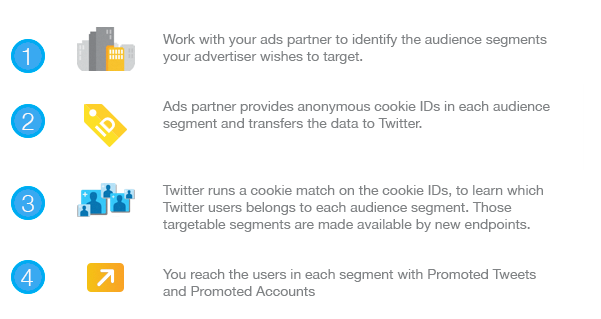 **How it works?**
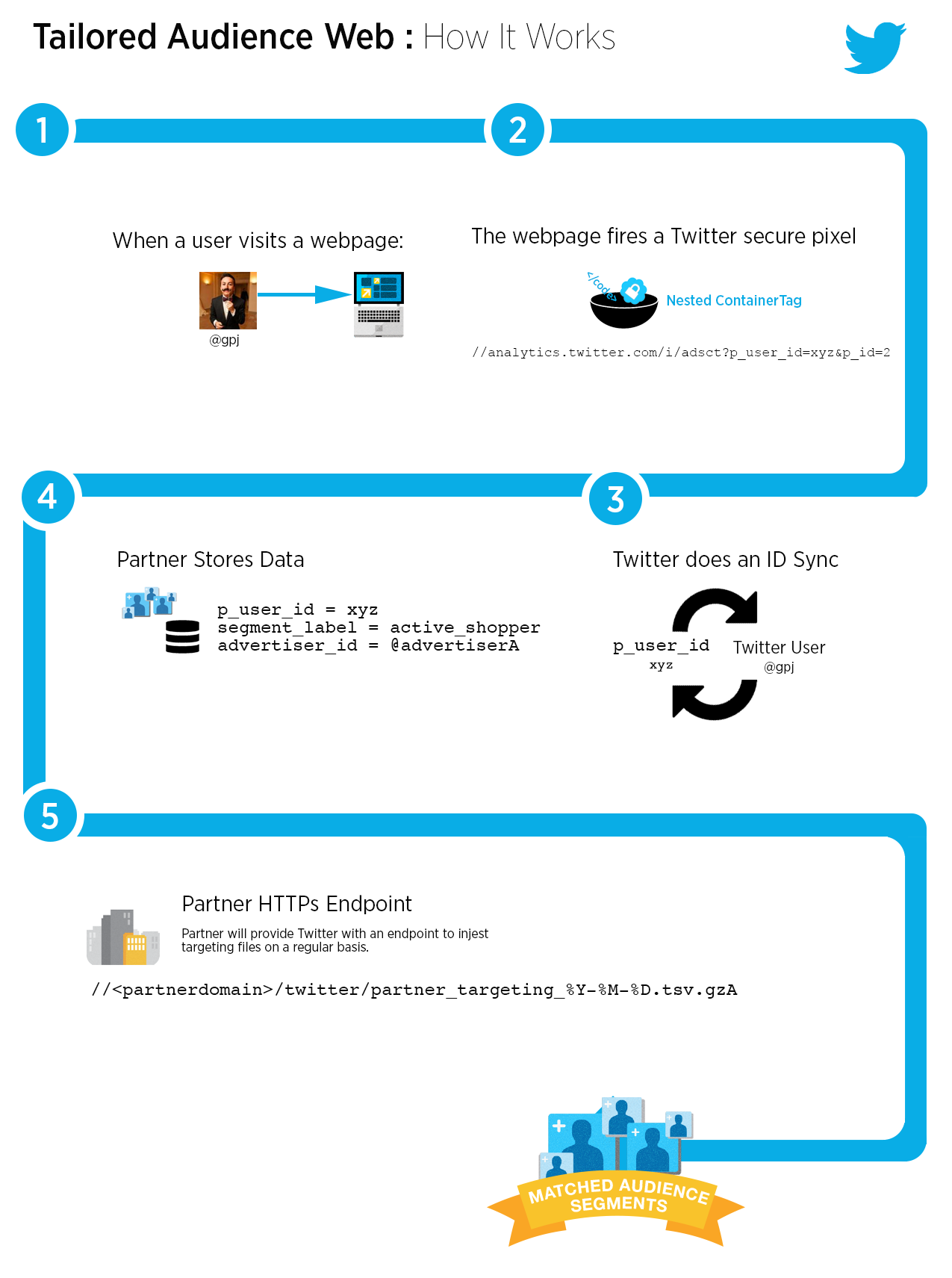 **Mobile**
Please see [the Custom Audiences from Mobile Apps blog post](https://blog.x.com/2014/introducing-tailored-audiences-from-mobile-apps) for details.
**Flexible**
[Flexible audiences](/x-ads-api/audiences) give advertisers the ability to build and save audience combinations based on existing custom audiences or subsets of existing custom audiences. Subsets of a custom audience’s members can be targeted based on the recency and frequency of interaction.
**Restricted Use Cases for Custome Audiences**
[Read more about restrictions](https://developer.x.com/en/developer-terms/more-on-restricted-use-cases "Read more about restrictions")
### Audiences FAQ[](#real-time-tailored-audiences "Permalink to this headline")
**Q: We pushed a huge amount of data, why does the audience size show up as TOO\_SMALL?**
A: Currently the data is being added into audience in realtime, but the job which processes data to provide audience size will run only after a period of time. The correct audience size should be displayed in the UI after a matter of hours.
**Q: We finished sending audience data, and waited 24 hours or more, but still cannot target the audience - what should we do as next steps?**
A: Please confirm that the following things:
* The user ID being passed is correct and not malformed.
* The audience names being passed are correct and match previous membership updates.
* Please confirm the response from POST commands.
* Please confirm the ID Sync pixel is implemented correctly, and as described by ID Sync process enough users have visited the site in question to map users. Unmapped users in the membership updates will not be translated into targeted users.
If all else are confirmed as correct and working, please contact X product contacts with information as detailed as possible (see [Guide to Partner Inbounds](/x-ads-api/introduction) for example of preferred information).
**Q: How many times can we call the endpoint, and with what algorithm?**
A: We strongly recommend that you call our system with incremental deltas, and never re-send the complete audience memberships. The system has been tested to have a throughput sufficient to process incremental data updates for some of the largest websites in the world. The initial upload of audiences should be carefully throttled and first upload is expected to take a significant amount of time to complete.
**Q: What is the minimum size for an audience to be used for targeting?**
* The minimum size for an audience to is 100 users (post match). If an audience with less than 500 users is matched, it will not be available for targeting in the X Ads UI.
**Q: How long will it take to process the audience files? And how long will it take for the audience files to be ready in the X User Interface?**
* It typically takes 4-6 hours to process the audience files, but that will depend on the size of the file. Once the file is processed the audiences are available on the X Ads UI.
**Q: How is the match rate calculated?**
* Match Rate = 90 day active X users / number of users provided
**Q: How do we test if an audience file is working properly?**
* You can provide a test audience file and use “keltonlynn” as the advertiser handle. We can then verify that the file is able to be properly ingested and loaded into the X UI.
**Q: What is a partner user identifier (`p_user_id`)?**
* This is the identifier that is used by your company to uniquely identify each of your customers.
**Q: What is a standard ID?**
* This can be an email address, device ID, X @handle or ID).
**Q: How do I get the HMAC Key?**
* This will be provided by an encrypted email. Please provide your public PGP key to [mpp-inquiry@x.com](mailto:mpp-inquiry%x.com) and we will send you a test email to verify that everything is working. Once verified, we will send you the HMAC Key.
**Q: How do I verify that the hashing process worked using the given HMAC Key?**
* X will provide a test file (containing sample email addresses, device IDs, etc…) and a resulting hash file that you can verify your results against.
**Q: Is there a file size limitation for the full data match file?**
* No, there is no size limitation for the full data match file.
**Q: How long will it take for the full data match file to be processed?**
* Once the file is received by X, it will take approximately 1 day to process the file.
### CRM
This document describes the integration details for Custom Audiences CRM partners including file formats & data exchange process.
**Summary**
Company will provide a list of hashed common user identifiers (i.e. e-mail addresses) or partner user IDs on behalf of a customer to X to perform a blind match and produce a list of X User IDs for targeting. The segments for targeting will be made available to the advertiser’s specific @handle specified by the filename in ads.x.com campaign setup.
All files from Company will be provided to X through a secure package on IronBox ([www.golockbox.com](http://www.golockbox.com)) through a specific account granted to Company by X. X will provide access to IronBox. Documentation on IronBox APIs can be found at [https://secure.goironcloud.com/Docs/Help/](https://secure.goironcloud.com/Docs/Help/).
#### Partner ID Matching Requirements
If company uses its own standard ID system to track users (i.e. not common user identifiers like email addresses, device ids, X user ID, etc...) then this is the recommended process.
**1. Full Data match**
Initially, Company will provide a comprehensive list of all user records which include a unique common user identifier with X in a single file to perform a full data match and produce a mapping stored by X of Partner IDs (`p_user_id`) to X IDs (`tw_id`). This will be done on a 2-3 month basis regularly to ensure proper upkeep. Once the match is completed, X will share a baseline match rate from this file with Company via e-mail.
The format of this file should be:
Name Convention: FullDataMatch.\[CompanyName].txt
Hashing Algorithm: HMAC\_SHA-256
Format:
Column 1: HMAC hashed value of common identifiers
Column 2: Partner User ID (unique per user, non-unique in file)
Column Delimiter (CSV): Commas will be used to delimit the hashed common user identifier from the Partner ID
Line separated values
* Ex: If user record A has Partner User ID 1 and common identifier 1, 2 and 3:
| | |
| :----------------------- | :--------- |
| common user identifier 1 | p\_user\_1 |
| common user identifier 2 | p\_user\_1 |
| common user identifier 3 | p\_user\_1 |
\*See Hashing Directions section for common user identifiers below
**2. Custom Segment Lists**
Company will provide lists of users in the form of `p_user_id` to create custom audiences for customers for targeting on X.
* Line separated values
* `p_user_id`
* * (Same as provided in 1. Full Data Match section above. If the value provided in full data match is hashed then Company will provide same hashed value in audience file. If value provided is not hashed then Company will provide unhashed value.)
#### Standard Matching Requirements
If company does not use a standard ID for mapping of all customer user identifiers, this is the recommended process.
**Custom Segment Lists**
Company will provide lists of hashed common user identifiers directly to X on behalf of customers to create custom audiences.
The format of this file should be:
* Line separated values
* Hashed common user identifier (i.e. e-mail address)
* Follow file naming conventions outlined below
* Follow hashing directions for e-mail addresses below (in Hashing Directions)
#### Custom Segment List File Naming & Operations
The operation of a file will be dictated by the name of the file with the following available operations and general file naming convention: audiencename\_partnername.handle.operation.filetype
* audiencename: The name of the Custom Audience. This field is the name that will be displayed when selecting the audience in the ads.x.com campaign setup UI e.g. brand\_loyalty\_card\_holders.
* partnername: Name of the company delivering the data on behalf of advertiser e.g. company\_name.
* handle: X Account (@handle) that will have access to Custom Audiences e.g. @pepsi, @dietpepsi
* operation: new, add, remove, removeall, replace (details below)
* : Standard Unix epoch time in seconds, used to ensure that each audience file uploaded is unique
* filetype: file should be in \*.txt format
#### Creating and Updating Audiences
Create a new audience with a single file e.g. loyalty\_card\_holders\_partnername.pepsi.new\.txt
Add - Add the matches from a list to an existing audience e.g. loyalty\_card\_holders\_partnername.pepsi.add.txt
Remove - Remove the matches from a list from an existing audience Ex: loyalty\_card\_holders\_partnername.pepsi.remove.txt
Remove All - Remove the matches produced from a regularly updated cumulative list from all audiences for that client (i.e. Client’s Opt Out List). Ex: partnername.pepsi.removeall.txt
* This can be used for a comprehensive list of users who have opted-out from the Advertiser.
* X will only respect the latest list provided in this file, and will respect across all existing and future audiences for matched.
X users at the time this file was provided & processed.
Replace - Remove an existing audience and replace it with a new audience list. Ex: loyalty\_card\_holders\_partnername.pepsi.replace.txt
Overall Company Opt-Out - Company will provide a cumulative Opt-Out file to remove users that have opted out as per the Company’s Opt-Out policy.
X will only respect the latest list provided in this Company Opt-Out file and will respect across all existing and future audiences for matched X users at the time this file was provided & processed. The format of the Company Opt-Out file will be as follows: Ex: partnername.removeall.txt
Delete - Remove an existing audience from the current list of audiences e.g. Ex: loyalty\_card\_holders\_partnername.pepsi.delete.txt
#### Hashing Directions
X will securely share a base64 encoded production key via PGP for hashing common user identifiers (i.e. email addresses). Company will base64 decode the key to produce a 32-byte key to be used to perform the hashing.
Example base64 encoded key:
BrQvOg+dACBUmKjRiNxZgJLh6zydjS0ZOv80FelTNzM=
Example Base64 decoded key:
/:� TшY
Normalization: Company will perform basic normalization on the common user identifiers before hashing (except on Device IDs, see Device ID Normalization section).
#### E-mail Normalization
Namely, strip out the leading and trailing spaces and also lowercase the email address.
Ex: Raw e-mail address: testemail\_Organisational\_baseball+884`@`It92I6Ev2B`.`Com
After normalization: testemail\_organisational\_baseball+884`@`it92i6ev2b`.`com
Hashed value: 74d9584eded0ad1e5572a1c1849f3716751d371d6117a6155dad5363f4b4fbec
Note: The specific number of characters for both the encoded hmac and key could vary based on the input and the encoding so the specific number of characters.
#### Device ID Normalization
We will have the same requirements for hashing of device IDs using a SHA-256 hashing algorithm and a common salt that we provide to data partners. We strip out spaces like we do with email addresses, but there is no lowercase normalization for IDFAs/Android IDs and the exact format of the IDFA/Android ID should be used.
Here is example raw format of Device IDs for iOS & Android, pre-hashing:
iOS IDFA: DD99CFF7-6186-4602-9DF2-ED3FD0B2D431
Android ID: b5bf2122961b3595
Hashed iOS IDFA: 134fb8cd95c7fd42e2793f469a447198ca5f990968db2dbadad70e723ed9750b
Hashed Android ID: 130dddff1939f229476f50bc8adab8fcb7e3525b0e9604fe8effc15e68cee4a4
#### X User ID Normalization
X IDs will still be hashed as the grouping of data - ie Customer List of @handles - is private to the advertiser even though it is not PII. We will have the same requirements for hashing of X IDs using a SHA-256 hashing algorithm and a common salt that we provide to data partners. Spaces should be stripped out of both the X ID/`@`username, but User IDs do not require normalization. @usernames should be lowercased for normalization. And the @ symbol should not be included as part of the username.
The raw ID format will be:
* User ID: 27674040
* @username: testusername
Hashed User ID: bf6b57d4e861e83bea8bbed2b800b251a64c95468ee6e8cb07c3368c9ed45e85
Hashed @username: 12201ae78ad1afa907c7112d17f498154ffb0bf9ea523f5390e072a06d7d9812
### ID Sync Integration
Partners sending data with a `p_id` must undergo an ID Sync process to generate a mapping of the advertiser or partner’s user ids to X user ids. This allows advertisers to directly target their own user segments on X. Partners must also set the value of the param `user_identifier_type` to either `TALIST_PARTNER_USER_ID` or `TAWEB_PARTNER_USER_ID` while sending their membership updates.
* **Web Only**: This can be done by placing a pixel on the advertiser’s site, as outlined below.
* **List**: This can be done using any of the methods described on the [CRM](/x-ads-api/audiences/reference#crm) page.
#### Pixel URL
| |
| :----------------------------------------------------------------- |
| **Base URL** |
| [https://analytics.x.com/i/adsct](https://analytics.x.com/i/adsct) |
#### Pixel Parameters
| | |
| :------------ | :---------------------------------- |
| **Parameter** | **Description** |
| `p_id` | Your X-assigned partner id |
| `p_user_id` | The user’s id in the partner system |
#### ID Sync Pixel:
Using an example partner id of 111, and an example `p_user_id` of abc, the constructed pixel would be the following:
```json theme={null}
**Mobile**
Please see [the Custom Audiences from Mobile Apps blog post](https://blog.x.com/2014/introducing-tailored-audiences-from-mobile-apps) for details.
**Flexible**
[Flexible audiences](/x-ads-api/audiences) give advertisers the ability to build and save audience combinations based on existing custom audiences or subsets of existing custom audiences. Subsets of a custom audience’s members can be targeted based on the recency and frequency of interaction.
**Restricted Use Cases for Custome Audiences**
[Read more about restrictions](https://developer.x.com/en/developer-terms/more-on-restricted-use-cases "Read more about restrictions")
### Audiences FAQ[](#real-time-tailored-audiences "Permalink to this headline")
**Q: We pushed a huge amount of data, why does the audience size show up as TOO\_SMALL?**
A: Currently the data is being added into audience in realtime, but the job which processes data to provide audience size will run only after a period of time. The correct audience size should be displayed in the UI after a matter of hours.
**Q: We finished sending audience data, and waited 24 hours or more, but still cannot target the audience - what should we do as next steps?**
A: Please confirm that the following things:
* The user ID being passed is correct and not malformed.
* The audience names being passed are correct and match previous membership updates.
* Please confirm the response from POST commands.
* Please confirm the ID Sync pixel is implemented correctly, and as described by ID Sync process enough users have visited the site in question to map users. Unmapped users in the membership updates will not be translated into targeted users.
If all else are confirmed as correct and working, please contact X product contacts with information as detailed as possible (see [Guide to Partner Inbounds](/x-ads-api/introduction) for example of preferred information).
**Q: How many times can we call the endpoint, and with what algorithm?**
A: We strongly recommend that you call our system with incremental deltas, and never re-send the complete audience memberships. The system has been tested to have a throughput sufficient to process incremental data updates for some of the largest websites in the world. The initial upload of audiences should be carefully throttled and first upload is expected to take a significant amount of time to complete.
**Q: What is the minimum size for an audience to be used for targeting?**
* The minimum size for an audience to is 100 users (post match). If an audience with less than 500 users is matched, it will not be available for targeting in the X Ads UI.
**Q: How long will it take to process the audience files? And how long will it take for the audience files to be ready in the X User Interface?**
* It typically takes 4-6 hours to process the audience files, but that will depend on the size of the file. Once the file is processed the audiences are available on the X Ads UI.
**Q: How is the match rate calculated?**
* Match Rate = 90 day active X users / number of users provided
**Q: How do we test if an audience file is working properly?**
* You can provide a test audience file and use “keltonlynn” as the advertiser handle. We can then verify that the file is able to be properly ingested and loaded into the X UI.
**Q: What is a partner user identifier (`p_user_id`)?**
* This is the identifier that is used by your company to uniquely identify each of your customers.
**Q: What is a standard ID?**
* This can be an email address, device ID, X @handle or ID).
**Q: How do I get the HMAC Key?**
* This will be provided by an encrypted email. Please provide your public PGP key to [mpp-inquiry@x.com](mailto:mpp-inquiry%x.com) and we will send you a test email to verify that everything is working. Once verified, we will send you the HMAC Key.
**Q: How do I verify that the hashing process worked using the given HMAC Key?**
* X will provide a test file (containing sample email addresses, device IDs, etc…) and a resulting hash file that you can verify your results against.
**Q: Is there a file size limitation for the full data match file?**
* No, there is no size limitation for the full data match file.
**Q: How long will it take for the full data match file to be processed?**
* Once the file is received by X, it will take approximately 1 day to process the file.
### CRM
This document describes the integration details for Custom Audiences CRM partners including file formats & data exchange process.
**Summary**
Company will provide a list of hashed common user identifiers (i.e. e-mail addresses) or partner user IDs on behalf of a customer to X to perform a blind match and produce a list of X User IDs for targeting. The segments for targeting will be made available to the advertiser’s specific @handle specified by the filename in ads.x.com campaign setup.
All files from Company will be provided to X through a secure package on IronBox ([www.golockbox.com](http://www.golockbox.com)) through a specific account granted to Company by X. X will provide access to IronBox. Documentation on IronBox APIs can be found at [https://secure.goironcloud.com/Docs/Help/](https://secure.goironcloud.com/Docs/Help/).
#### Partner ID Matching Requirements
If company uses its own standard ID system to track users (i.e. not common user identifiers like email addresses, device ids, X user ID, etc...) then this is the recommended process.
**1. Full Data match**
Initially, Company will provide a comprehensive list of all user records which include a unique common user identifier with X in a single file to perform a full data match and produce a mapping stored by X of Partner IDs (`p_user_id`) to X IDs (`tw_id`). This will be done on a 2-3 month basis regularly to ensure proper upkeep. Once the match is completed, X will share a baseline match rate from this file with Company via e-mail.
The format of this file should be:
Name Convention: FullDataMatch.\[CompanyName].txt
Hashing Algorithm: HMAC\_SHA-256
Format:
Column 1: HMAC hashed value of common identifiers
Column 2: Partner User ID (unique per user, non-unique in file)
Column Delimiter (CSV): Commas will be used to delimit the hashed common user identifier from the Partner ID
Line separated values
* Ex: If user record A has Partner User ID 1 and common identifier 1, 2 and 3:
| | |
| :----------------------- | :--------- |
| common user identifier 1 | p\_user\_1 |
| common user identifier 2 | p\_user\_1 |
| common user identifier 3 | p\_user\_1 |
\*See Hashing Directions section for common user identifiers below
**2. Custom Segment Lists**
Company will provide lists of users in the form of `p_user_id` to create custom audiences for customers for targeting on X.
* Line separated values
* `p_user_id`
* * (Same as provided in 1. Full Data Match section above. If the value provided in full data match is hashed then Company will provide same hashed value in audience file. If value provided is not hashed then Company will provide unhashed value.)
#### Standard Matching Requirements
If company does not use a standard ID for mapping of all customer user identifiers, this is the recommended process.
**Custom Segment Lists**
Company will provide lists of hashed common user identifiers directly to X on behalf of customers to create custom audiences.
The format of this file should be:
* Line separated values
* Hashed common user identifier (i.e. e-mail address)
* Follow file naming conventions outlined below
* Follow hashing directions for e-mail addresses below (in Hashing Directions)
#### Custom Segment List File Naming & Operations
The operation of a file will be dictated by the name of the file with the following available operations and general file naming convention: audiencename\_partnername.handle.operation.filetype
* audiencename: The name of the Custom Audience. This field is the name that will be displayed when selecting the audience in the ads.x.com campaign setup UI e.g. brand\_loyalty\_card\_holders.
* partnername: Name of the company delivering the data on behalf of advertiser e.g. company\_name.
* handle: X Account (@handle) that will have access to Custom Audiences e.g. @pepsi, @dietpepsi
* operation: new, add, remove, removeall, replace (details below)
* : Standard Unix epoch time in seconds, used to ensure that each audience file uploaded is unique
* filetype: file should be in \*.txt format
#### Creating and Updating Audiences
Create a new audience with a single file e.g. loyalty\_card\_holders\_partnername.pepsi.new\.txt
Add - Add the matches from a list to an existing audience e.g. loyalty\_card\_holders\_partnername.pepsi.add.txt
Remove - Remove the matches from a list from an existing audience Ex: loyalty\_card\_holders\_partnername.pepsi.remove.txt
Remove All - Remove the matches produced from a regularly updated cumulative list from all audiences for that client (i.e. Client’s Opt Out List). Ex: partnername.pepsi.removeall.txt
* This can be used for a comprehensive list of users who have opted-out from the Advertiser.
* X will only respect the latest list provided in this file, and will respect across all existing and future audiences for matched.
X users at the time this file was provided & processed.
Replace - Remove an existing audience and replace it with a new audience list. Ex: loyalty\_card\_holders\_partnername.pepsi.replace.txt
Overall Company Opt-Out - Company will provide a cumulative Opt-Out file to remove users that have opted out as per the Company’s Opt-Out policy.
X will only respect the latest list provided in this Company Opt-Out file and will respect across all existing and future audiences for matched X users at the time this file was provided & processed. The format of the Company Opt-Out file will be as follows: Ex: partnername.removeall.txt
Delete - Remove an existing audience from the current list of audiences e.g. Ex: loyalty\_card\_holders\_partnername.pepsi.delete.txt
#### Hashing Directions
X will securely share a base64 encoded production key via PGP for hashing common user identifiers (i.e. email addresses). Company will base64 decode the key to produce a 32-byte key to be used to perform the hashing.
Example base64 encoded key:
BrQvOg+dACBUmKjRiNxZgJLh6zydjS0ZOv80FelTNzM=
Example Base64 decoded key:
/:� TшY
Normalization: Company will perform basic normalization on the common user identifiers before hashing (except on Device IDs, see Device ID Normalization section).
#### E-mail Normalization
Namely, strip out the leading and trailing spaces and also lowercase the email address.
Ex: Raw e-mail address: testemail\_Organisational\_baseball+884`@`It92I6Ev2B`.`Com
After normalization: testemail\_organisational\_baseball+884`@`it92i6ev2b`.`com
Hashed value: 74d9584eded0ad1e5572a1c1849f3716751d371d6117a6155dad5363f4b4fbec
Note: The specific number of characters for both the encoded hmac and key could vary based on the input and the encoding so the specific number of characters.
#### Device ID Normalization
We will have the same requirements for hashing of device IDs using a SHA-256 hashing algorithm and a common salt that we provide to data partners. We strip out spaces like we do with email addresses, but there is no lowercase normalization for IDFAs/Android IDs and the exact format of the IDFA/Android ID should be used.
Here is example raw format of Device IDs for iOS & Android, pre-hashing:
iOS IDFA: DD99CFF7-6186-4602-9DF2-ED3FD0B2D431
Android ID: b5bf2122961b3595
Hashed iOS IDFA: 134fb8cd95c7fd42e2793f469a447198ca5f990968db2dbadad70e723ed9750b
Hashed Android ID: 130dddff1939f229476f50bc8adab8fcb7e3525b0e9604fe8effc15e68cee4a4
#### X User ID Normalization
X IDs will still be hashed as the grouping of data - ie Customer List of @handles - is private to the advertiser even though it is not PII. We will have the same requirements for hashing of X IDs using a SHA-256 hashing algorithm and a common salt that we provide to data partners. Spaces should be stripped out of both the X ID/`@`username, but User IDs do not require normalization. @usernames should be lowercased for normalization. And the @ symbol should not be included as part of the username.
The raw ID format will be:
* User ID: 27674040
* @username: testusername
Hashed User ID: bf6b57d4e861e83bea8bbed2b800b251a64c95468ee6e8cb07c3368c9ed45e85
Hashed @username: 12201ae78ad1afa907c7112d17f498154ffb0bf9ea523f5390e072a06d7d9812
### ID Sync Integration
Partners sending data with a `p_id` must undergo an ID Sync process to generate a mapping of the advertiser or partner’s user ids to X user ids. This allows advertisers to directly target their own user segments on X. Partners must also set the value of the param `user_identifier_type` to either `TALIST_PARTNER_USER_ID` or `TAWEB_PARTNER_USER_ID` while sending their membership updates.
* **Web Only**: This can be done by placing a pixel on the advertiser’s site, as outlined below.
* **List**: This can be done using any of the methods described on the [CRM](/x-ads-api/audiences/reference#crm) page.
#### Pixel URL
| |
| :----------------------------------------------------------------- |
| **Base URL** |
| [https://analytics.x.com/i/adsct](https://analytics.x.com/i/adsct) |
#### Pixel Parameters
| | |
| :------------ | :---------------------------------- |
| **Parameter** | **Description** |
| `p_id` | Your X-assigned partner id |
| `p_user_id` | The user’s id in the partner system |
#### ID Sync Pixel:
Using an example partner id of 111, and an example `p_user_id` of abc, the constructed pixel would be the following:
```json theme={null}

```
**Opt-Out File Configuration and Sending Opt-Out Files**
Partners should provide X with a list of users that to the partner’s best knowledge have selected to opt-out of targeted ad delivery. The format of file should be sent as:
| | | | |
| :---------------- | :---------------------------------- | :-------------- | :------------------------------------------------------------------------------------------------------------------------------------------------------------------------------------------------------------------------------------------------------------------------------------------------------------------------------------------------------------------------- |
| **Column Number** | **Column Name** | **Column Type** | **Description** |
| 1 | Partner ID | string | The “partner id” is the ID that X provides to the Partner in order to uniquely identify each Partner. |
| 2 | The user’s id in the partner system | string | The `p_user_id` is the unique ID that is used to identify the user by the Partner. The file containing these opt-out users should be uploaded using the [TON upload](/x-ads-api/audiences) endpoint and the path of uploaded data should be sent to the Global Opt Out endpoint here:[PUT accounts/:account\_id/custom\_audiences/global\_opt\_out](/x-ads-api/audiences). |
**Sending Membership Updates**
As specified in our endpoint documentation, when passing users via the [POST custom\_audience\_memberships](/x-ads-api/audiences) endpoint you should pass a customer ID to enable a cookie based match. Partners sending data with a `p_id` **must** set the `user_identifier_type` to `TALIST_PARTNER_USER_ID` or `TAWEB_PARTNER_USER_ID`.
All other steps will remain the same as those listed in the [Real-Time Audience API Integration Guide](/x-ads-api/audiences)
### Custom Audiences User Data
This document outlines the format for \[Custom Audience]/x-ads-api/audiences user data.
**Data normalization**
**Device IDs**:
* IDFA - lower-cased with dashes; ex: `4b61639e-47cc-4056-a16a-c8217e029462`
* AdID - original format on device is required, not capitalized with dashes; ex: `2f5f5391-3e45-4d02-b645-4575a08f86e`
* Android id - original format on device is required, not capitalized without dashes or spaces; ex: `af3802a465767e36`
**Email Addresses**:
* lowercase, remove leading and trailing spaces; ex: `support@x.com`
**X Usernames**:
* no @, lowercased and leading and trailing spaces trimmed; ex: `jack`
**X User IDs**:
* Standard integer; ex: `143567`
**Data hashing**
The data for each line must be hashed using `SHA256`, without a salt. Additionally, the final output hash must be in lower case. E.g., 49e0be2aeccfb51a8dee4c945c8a70a9ac500cf6f5cb08112575f74db9b1470d and \*\*not \*\*49E0BE2AECCFB51A8DEE4C945C8A70A9AC500CF6F5CB08112575F74DB9B1470D
```
# hasing user @AdsAPI using python
import hashlib
hashlib.sha256("adsapi".encode()).hexdigest()
#output
49e0be2aeccfb51a8dee4c945c8a70a9ac500cf6f5cb08112575f74db9b1470d
```
Additional code samples for hashing can be found at [github.com/xdevplatform/ads-platform-tools](https://github.com/xdevplatform/ads-platform-tools).
### Custom Audiences: Web
 **Information**
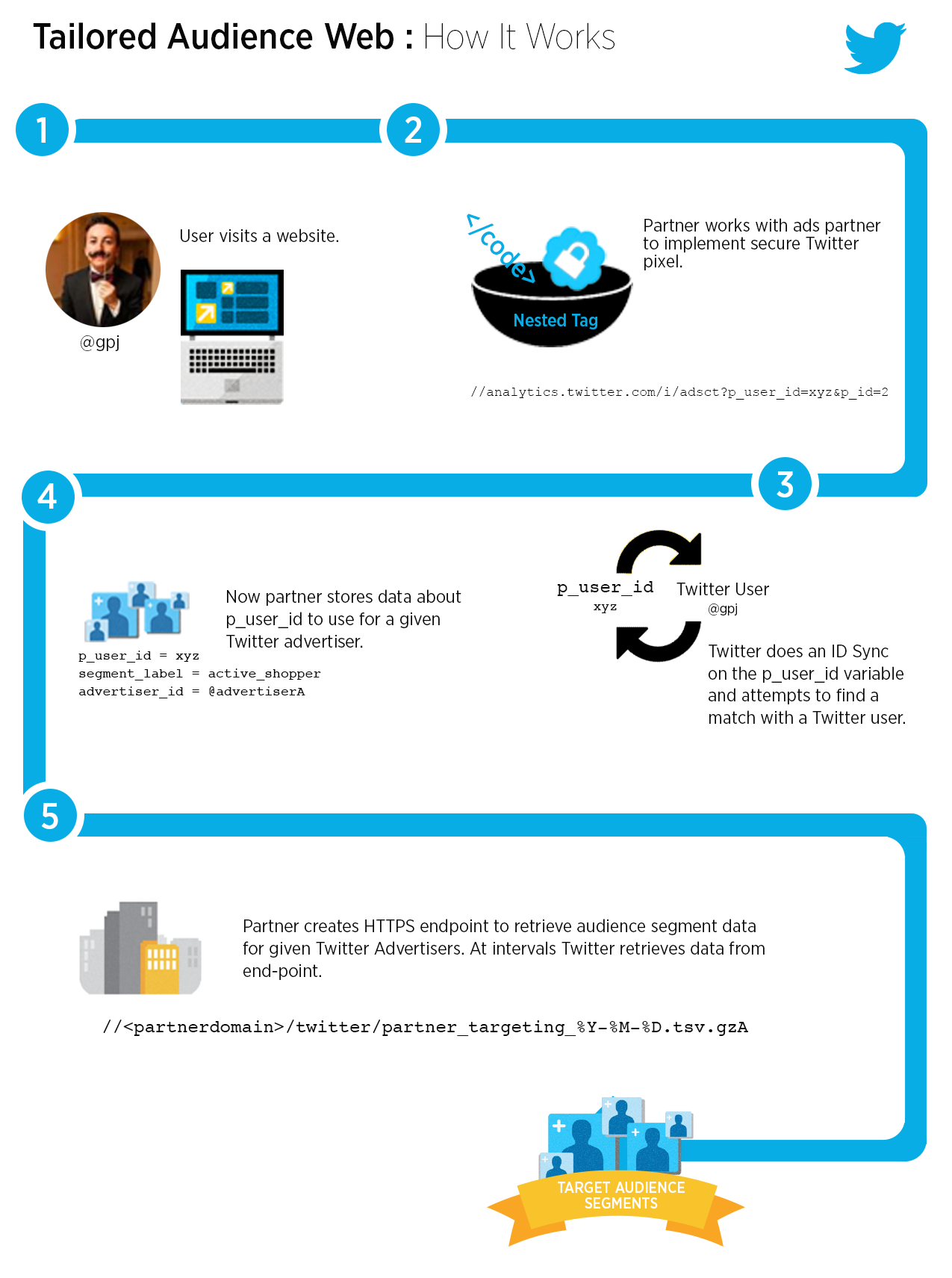
Partners will send a list of IDs (`p_user_ids`) to target on behalf of an advertiser. This is accomplished through an ID Sync process that builds a mapping between the `p_user_ids` and X user ID. This mapping is then used to produce lists of X User IDs that can be used for Targeting. These custom audiences will be made available on the advertiser’s specific @handle specified by the label on ads.x.com Custom Audiences Web campaign setup.
X will provide the secure pixel that can be dropped on partner tags and sites in order to match the IDs (`p_user_ids`) to X user IDs. Once the ID Sync process is complete, the targeting files will be created by the partner and will be made available to X through an HTTPS endpoint. These targeting files are ingested on a regular basis by X and are then made available in the X UI.
**X Secure Pixel**
The X secure pixel will look as follows:
[https://analytics.x.com/i/adsct?p\\\_user\\\_id=xyz\&p\_id=123](https://analytics.x.com/i/adsct?p\\_user\\_id=xyz\&p_id=123)
**`p_user_id`** - xyz represents the partner user ID that is provided by the Partner
**`p_id`** - 123 represents the unique ID for the Partner (provided by X)
**Partner HTTPS Endpoint & Targeting User File**
Partner will need to provide X with an HTTPS endpoint and credentials (username/password) that can be used to ingest the targeting file on a regular basis. A sample HTTPS endpoint will look as follows:
```
https:///twitter/partner_targeting_%Y-%M-%D.tsv.gz
```
%Y - Format Code for Year (YYYY)
%M - Format Code for Month (MM)
%D - Format Code for Day (DD)
The transmitted data will consist of the following files:
1. Partner Targeting User File
2. Targeting Conversion File
All the files will be in the TSV format, where the individual fields of each row are separated from each other by a tab character. Valid field values themselves will never contain the tab character.
**Allowed X IP Range:**
Here is the range of IPs that can be allowed for access to the Partner Endpoint.
* 199.16.156.0/22
* 199.59.148.0/22
**Partner Targeting User File:**
| **Column Number** | **Column Name** | **Column Type** | **Description** |
| :---------------- | :--------------- | :-------------- | :----------------------------------------------------------------------------------------------------------------------------------------------------------------------------------------------------------------------------------------------------------------------------------------------- |
| 1 | partner id | string | The “partner id” is the ID that X provides to the Partner in order to uniquely identify each Partner. |
| 2 | advertiser id | string | The “advertiser id” is the @handle for the advertiser. |
| 3 | p\_user\_id | string | The “p\_user\_id” is the unique ID that is used to identify the user by the Partner. |
| 3 | confidence score | integer | The “confidence score” is optional. Our recommendation for confidence score is to use 0-100. If the use case is for retargeting, then a confidence score of “100” is a user who has been directly retargeted. Any score from 0-99 would correspond to the level of confidence of the look-alike. |
| 4 | segment label | string | The “segment label” is optional. Partners can use “segment label” to specify product categories, for example. Our recommendation is to use this “segment label” as this is the human readable name for Custom Audiences in the ads.x.com UI. |
**Notes:**
Every time we receive a new Partner Targeting File, we expect this to be the full list of users that Partner recommends us to target, not incremental, unless otherwise agreed upon. We will agree with each partner what the frequency of delivery of this Partner Targeting File will be. If we do not receive a Partner Targeting File as expected, we will use the previous version with some pre-defined expiration time.
## Audience API Integration
### Overview
The Audience API was launched as part of [v4](/x-ads-api/introduction) of the Ads API and with it, brings several improvements to the legacy Audiences endpoints. This new endpoint is backed by a new Audience processing backend, and brings several improvements in terms of stability, robustness and reliability. The purpose of this guide is to highlight the differences between the Audience API and the legacy Audience upload and management processes.
Reference documentation can be found on the [Audience API](/x-ads-api/audiences) reference documentation page.
**Note**: All Audience user data must be SHA-256 hashed prior to upload. More details, along with the accepted user identifier types and data normalization can be found on the [user data](/x-ads-api/audiences) page.
**Changes to Audience Functionality**
The following changes to Custom Audiences have been introduced as of v4 and any deprecated endpoints will no longer be available once v3 of the Ads API has been sunset:
* **Deprecated** TON Upload:
* GET accounts/:account\_id/custom\_audience\_changes
* GET accounts/:account\_id/custom\_audience\_changes/:custom\_audience\_change\_id
* POST accounts/:account\_id/custom\_audience\_changes
* PUT accounts/:account\_id/custom\_audiences/global\_opt\_out
* **Deprecated** Real Time Audiences:
* POST custom\_audience\_memberships
* Custom Audience:
* The `list_type` parameter will be removed from the request and response on all [Custom Audience](/x-ads-api/audiences) endpoints. This parameter was previously used to identify the user identifier type of the Audience (i.e., email, X User ID, etc.) however Audiences now have the ability to accept multiple user identifiers for the same Audience thereby making this value irrelevant.
* General:
* The Audience lookback window has been updated to match against users active within the past 90 days (from 30 days)
* The minimum number of matched users required for an audience to be targetable has been decreased to 100 users (from 500 users)
**Prerequisites**
* Ads API access
* For access to the Audience endpoint, you will need to be added to an allowlist. Please fill this form and accept the new [X Ads Products and Services Agreement](/x-ads-api/introduction) if initially accepted prior to 2018-08-01
**Audience Upload Process**
The following table lists the primary differences between the old and new Audience creation flows, with more details available further below:
| Step in Process | Audience API | (Deprecated) TON Upload |
| :---------------------- | :---------------------------------------------------------------------------------------------------------------------------------------------------------- | :---------------------------------------------------------------------------------------------------- |
| Create a shell Audience | Can be created via the \[POST custom\_audience endpoint]/x-ads-api/audiences | Can be created via the \[POST custom\_audience endpoint]/x-ads-api/audiences |
| Add a new user | Use the `operation_type` `Update` with the [Audience endpoint](/x-ads-api/audiences) | Use the `operation` `ADD` with the [POST custom\_audience\_changes](/x-ads-api/audiences) endpoint |
| Remove a user | Use the `operation_type` `Delete` with the [Audience endpoint](/x-ads-api/audiences) | Use the `operation` `REMOVE` with the [POST custom\_audience\_changes](/x-ads-api/audiences) endpoint |
| Opting-Out Users | Use the `operation_type` `Delete` with the [Audience endpoint](/x-ads-api/audiences) and the corresponding `custom_audience_id`s that the user is a part of | Use the [Global opt-out endpoint](/x-ads-api/audiences) |
**Note** Any audiences being updated or opted-out via the TON Upload path must have a corresponding list uploaded via the [TON Upload](/x-ads-api/audiences) endpoint and associated with an Audience using the [custom\_audience\_changes](/x-ads-api/audiences) endpoint.
**Rate Limiting**
The Audience API endpoint has a rate limit of 1500/1min per account. There are no limits on the number of users that can be sent in a single payload. The only constraints on the payload are:
1\. Total number of operations: 2500 operations
2\. Maximum payload size: 5,000,000 bytes
**Audience User Management**
In order to create a new Audience, the following steps are required
### Create a new Custom Audience
Create a new Custom Audience "shell" using the \[POST custom\_audience]/x-ads-api/audiences endpoint and retrieve the corresponding Custom Audience `id`. This step is required if creating an Audience from scratch. If updating an existing Audience, skip to the next section
### Add Users to an Audience
Use the [POST accounts/:account\_id/custom\_audiences/:custom\_audience\_id/users](/x-ads-api/audiences) with the Custom Audience `id` and a sample payload like so:
POST [https://ads-api.x.com/11/accounts/18ce54d4x5t/custom\_audiences/1nmth/users](https://ads-api.x.com/11/accounts/18ce54d4x5t/custom_audiences/1nmth/users)
```
# All values must be hashed, unhashed values are used in this example for illustrative purposes
[
{
"operation_type": "Update",
"params": {
"effective_at": "2018-05-15T00:00:00Z",
"expires_at": "2019-01-01T07:00:00Z",
"users": [
{
"email": [
"abc@x.com"
],
"handle": [
"x",
"adsapi"
]
},
{
"email": [
"edf@x.com"
],
"twitter_id": [
"121291606",
"17874544"
]
}
]
}
}
]
```
In order to add a user to an Audience, use the `operation_type` `Update`. The new Audience interface enables the ability to pass in multiple user keys for a single user. Each object in the array of JSON objects corresponds to a single user. Using the example payload above, the request will add two users to an Audience, one with an `email` and `handle` and another with an `email` and `twitter_id`.
#### Remove Users from an Audience
Similar to the process outlined for adding users, users can be removed from an audience using like so:
POST [https://ads-api.x.com/11/accounts/18ce54d4x5t/custom\_audiences/1nmth/users](https://ads-api.x.com/11/accounts/18ce54d4x5t/custom_audiences/1nmth/users)
```
# All values must be hashed, unhashed values are used in this example for illustrative purposes
[
{
"operation_type": "Delete",
"params": {
"effective_at": "2018-05-15T00:00:00Z",
"expires_at": "2019-01-01T07:00:00Z",
"users": [
{
"email": [
"abc@x.com"
],
"twitter_id": [
"783214",
"1225933934"
]
},
{
"email": [
"edf@x.com"
],
"twitter_id": [
"121291606",
"17874544"
]
}
]
}
}
]
```
The `operation_type` must be set to `Delete` and users will be matched on any keys that were present when adding users to the audience. For example, if a user was added to an audience using an `email` and `twitter_id`, then the same user can be removed using any one of these keys, i.e., either `email` or `twitter_id` or both.
Additionally, it is possible to add and remove users from an Audience within the same request. The endpoint supports multiple `operation_type` per request.
#### Opt-Out Users
With the deprecation of the global opt-out endpoint, partners are required to `Delete` any users that have opted-out of any Audiences. There are a few ways to achieve this:
1. Keep track of which users are part of which Audiences and remove these users individually from each Audience.
2. Remove the user from **all** Audiences associated with an Ads account.
**General Best Practices**
* We strongly recommend calling this endpoint in near real-time batches to avoid spiky queues which take longer to process and in general cause unnecessary load on our system. This also ensures users are available for campaign targeting sooner.
* A successful API call will return a `success_count` and `total_count` corresponding to the number of `user` objects that have been received in the request.
* This endpoint is atomic in nature, that is, either the entire request is successful or in case of any errors then the entire request will fail. In case of an error response, consumers of the API are recommended to fix the error and retry the request with the entire payload.
* Upon failure, partners recommended to use an [exponential backoff](https://en.wikipedia.org/wiki/Exponential_backoff) approach with retries. For example, retry immediately upon the first failure, retry after 1 minute after the second failure and retry after 5 minutes after the third consecutive failure, and so on
***
## Full API Reference
For the complete reference (Tailored Audience Permissions, Custom Audiences, Custom Audiences Users, Keyword Insights, Do Not Reach Lists, etc.), see the **[Audiences API Reference](/x-ads-api/audiences/reference)** page.
**Information**
Partners will send a list of IDs (`p_user_ids`) to target on behalf of an advertiser. This is accomplished through an ID Sync process that builds a mapping between the `p_user_ids` and X user ID. This mapping is then used to produce lists of X User IDs that can be used for Targeting. These custom audiences will be made available on the advertiser’s specific @handle specified by the label on ads.x.com Custom Audiences Web campaign setup.
X will provide the secure pixel that can be dropped on partner tags and sites in order to match the IDs (`p_user_ids`) to X user IDs. Once the ID Sync process is complete, the targeting files will be created by the partner and will be made available to X through an HTTPS endpoint. These targeting files are ingested on a regular basis by X and are then made available in the X UI.
**X Secure Pixel**
The X secure pixel will look as follows:
[https://analytics.x.com/i/adsct?p\\\_user\\\_id=xyz\&p\_id=123](https://analytics.x.com/i/adsct?p\\_user\\_id=xyz\&p_id=123)
**`p_user_id`** - xyz represents the partner user ID that is provided by the Partner
**`p_id`** - 123 represents the unique ID for the Partner (provided by X)
**Partner HTTPS Endpoint & Targeting User File**
Partner will need to provide X with an HTTPS endpoint and credentials (username/password) that can be used to ingest the targeting file on a regular basis. A sample HTTPS endpoint will look as follows:
```
https:///twitter/partner_targeting_%Y-%M-%D.tsv.gz
```
%Y - Format Code for Year (YYYY)
%M - Format Code for Month (MM)
%D - Format Code for Day (DD)
The transmitted data will consist of the following files:
1. Partner Targeting User File
2. Targeting Conversion File
All the files will be in the TSV format, where the individual fields of each row are separated from each other by a tab character. Valid field values themselves will never contain the tab character.
**Allowed X IP Range:**
Here is the range of IPs that can be allowed for access to the Partner Endpoint.
* 199.16.156.0/22
* 199.59.148.0/22
**Partner Targeting User File:**
| **Column Number** | **Column Name** | **Column Type** | **Description** |
| :---------------- | :--------------- | :-------------- | :----------------------------------------------------------------------------------------------------------------------------------------------------------------------------------------------------------------------------------------------------------------------------------------------- |
| 1 | partner id | string | The “partner id” is the ID that X provides to the Partner in order to uniquely identify each Partner. |
| 2 | advertiser id | string | The “advertiser id” is the @handle for the advertiser. |
| 3 | p\_user\_id | string | The “p\_user\_id” is the unique ID that is used to identify the user by the Partner. |
| 3 | confidence score | integer | The “confidence score” is optional. Our recommendation for confidence score is to use 0-100. If the use case is for retargeting, then a confidence score of “100” is a user who has been directly retargeted. Any score from 0-99 would correspond to the level of confidence of the look-alike. |
| 4 | segment label | string | The “segment label” is optional. Partners can use “segment label” to specify product categories, for example. Our recommendation is to use this “segment label” as this is the human readable name for Custom Audiences in the ads.x.com UI. |
**Notes:**
Every time we receive a new Partner Targeting File, we expect this to be the full list of users that Partner recommends us to target, not incremental, unless otherwise agreed upon. We will agree with each partner what the frequency of delivery of this Partner Targeting File will be. If we do not receive a Partner Targeting File as expected, we will use the previous version with some pre-defined expiration time.
## Audience API Integration
### Overview
The Audience API was launched as part of [v4](/x-ads-api/introduction) of the Ads API and with it, brings several improvements to the legacy Audiences endpoints. This new endpoint is backed by a new Audience processing backend, and brings several improvements in terms of stability, robustness and reliability. The purpose of this guide is to highlight the differences between the Audience API and the legacy Audience upload and management processes.
Reference documentation can be found on the [Audience API](/x-ads-api/audiences) reference documentation page.
**Note**: All Audience user data must be SHA-256 hashed prior to upload. More details, along with the accepted user identifier types and data normalization can be found on the [user data](/x-ads-api/audiences) page.
**Changes to Audience Functionality**
The following changes to Custom Audiences have been introduced as of v4 and any deprecated endpoints will no longer be available once v3 of the Ads API has been sunset:
* **Deprecated** TON Upload:
* GET accounts/:account\_id/custom\_audience\_changes
* GET accounts/:account\_id/custom\_audience\_changes/:custom\_audience\_change\_id
* POST accounts/:account\_id/custom\_audience\_changes
* PUT accounts/:account\_id/custom\_audiences/global\_opt\_out
* **Deprecated** Real Time Audiences:
* POST custom\_audience\_memberships
* Custom Audience:
* The `list_type` parameter will be removed from the request and response on all [Custom Audience](/x-ads-api/audiences) endpoints. This parameter was previously used to identify the user identifier type of the Audience (i.e., email, X User ID, etc.) however Audiences now have the ability to accept multiple user identifiers for the same Audience thereby making this value irrelevant.
* General:
* The Audience lookback window has been updated to match against users active within the past 90 days (from 30 days)
* The minimum number of matched users required for an audience to be targetable has been decreased to 100 users (from 500 users)
**Prerequisites**
* Ads API access
* For access to the Audience endpoint, you will need to be added to an allowlist. Please fill this form and accept the new [X Ads Products and Services Agreement](/x-ads-api/introduction) if initially accepted prior to 2018-08-01
**Audience Upload Process**
The following table lists the primary differences between the old and new Audience creation flows, with more details available further below:
| Step in Process | Audience API | (Deprecated) TON Upload |
| :---------------------- | :---------------------------------------------------------------------------------------------------------------------------------------------------------- | :---------------------------------------------------------------------------------------------------- |
| Create a shell Audience | Can be created via the \[POST custom\_audience endpoint]/x-ads-api/audiences | Can be created via the \[POST custom\_audience endpoint]/x-ads-api/audiences |
| Add a new user | Use the `operation_type` `Update` with the [Audience endpoint](/x-ads-api/audiences) | Use the `operation` `ADD` with the [POST custom\_audience\_changes](/x-ads-api/audiences) endpoint |
| Remove a user | Use the `operation_type` `Delete` with the [Audience endpoint](/x-ads-api/audiences) | Use the `operation` `REMOVE` with the [POST custom\_audience\_changes](/x-ads-api/audiences) endpoint |
| Opting-Out Users | Use the `operation_type` `Delete` with the [Audience endpoint](/x-ads-api/audiences) and the corresponding `custom_audience_id`s that the user is a part of | Use the [Global opt-out endpoint](/x-ads-api/audiences) |
**Note** Any audiences being updated or opted-out via the TON Upload path must have a corresponding list uploaded via the [TON Upload](/x-ads-api/audiences) endpoint and associated with an Audience using the [custom\_audience\_changes](/x-ads-api/audiences) endpoint.
**Rate Limiting**
The Audience API endpoint has a rate limit of 1500/1min per account. There are no limits on the number of users that can be sent in a single payload. The only constraints on the payload are:
1\. Total number of operations: 2500 operations
2\. Maximum payload size: 5,000,000 bytes
**Audience User Management**
In order to create a new Audience, the following steps are required
### Create a new Custom Audience
Create a new Custom Audience "shell" using the \[POST custom\_audience]/x-ads-api/audiences endpoint and retrieve the corresponding Custom Audience `id`. This step is required if creating an Audience from scratch. If updating an existing Audience, skip to the next section
### Add Users to an Audience
Use the [POST accounts/:account\_id/custom\_audiences/:custom\_audience\_id/users](/x-ads-api/audiences) with the Custom Audience `id` and a sample payload like so:
POST [https://ads-api.x.com/11/accounts/18ce54d4x5t/custom\_audiences/1nmth/users](https://ads-api.x.com/11/accounts/18ce54d4x5t/custom_audiences/1nmth/users)
```
# All values must be hashed, unhashed values are used in this example for illustrative purposes
[
{
"operation_type": "Update",
"params": {
"effective_at": "2018-05-15T00:00:00Z",
"expires_at": "2019-01-01T07:00:00Z",
"users": [
{
"email": [
"abc@x.com"
],
"handle": [
"x",
"adsapi"
]
},
{
"email": [
"edf@x.com"
],
"twitter_id": [
"121291606",
"17874544"
]
}
]
}
}
]
```
In order to add a user to an Audience, use the `operation_type` `Update`. The new Audience interface enables the ability to pass in multiple user keys for a single user. Each object in the array of JSON objects corresponds to a single user. Using the example payload above, the request will add two users to an Audience, one with an `email` and `handle` and another with an `email` and `twitter_id`.
#### Remove Users from an Audience
Similar to the process outlined for adding users, users can be removed from an audience using like so:
POST [https://ads-api.x.com/11/accounts/18ce54d4x5t/custom\_audiences/1nmth/users](https://ads-api.x.com/11/accounts/18ce54d4x5t/custom_audiences/1nmth/users)
```
# All values must be hashed, unhashed values are used in this example for illustrative purposes
[
{
"operation_type": "Delete",
"params": {
"effective_at": "2018-05-15T00:00:00Z",
"expires_at": "2019-01-01T07:00:00Z",
"users": [
{
"email": [
"abc@x.com"
],
"twitter_id": [
"783214",
"1225933934"
]
},
{
"email": [
"edf@x.com"
],
"twitter_id": [
"121291606",
"17874544"
]
}
]
}
}
]
```
The `operation_type` must be set to `Delete` and users will be matched on any keys that were present when adding users to the audience. For example, if a user was added to an audience using an `email` and `twitter_id`, then the same user can be removed using any one of these keys, i.e., either `email` or `twitter_id` or both.
Additionally, it is possible to add and remove users from an Audience within the same request. The endpoint supports multiple `operation_type` per request.
#### Opt-Out Users
With the deprecation of the global opt-out endpoint, partners are required to `Delete` any users that have opted-out of any Audiences. There are a few ways to achieve this:
1. Keep track of which users are part of which Audiences and remove these users individually from each Audience.
2. Remove the user from **all** Audiences associated with an Ads account.
**General Best Practices**
* We strongly recommend calling this endpoint in near real-time batches to avoid spiky queues which take longer to process and in general cause unnecessary load on our system. This also ensures users are available for campaign targeting sooner.
* A successful API call will return a `success_count` and `total_count` corresponding to the number of `user` objects that have been received in the request.
* This endpoint is atomic in nature, that is, either the entire request is successful or in case of any errors then the entire request will fail. In case of an error response, consumers of the API are recommended to fix the error and retry the request with the entire payload.
* Upon failure, partners recommended to use an [exponential backoff](https://en.wikipedia.org/wiki/Exponential_backoff) approach with retries. For example, retry immediately upon the first failure, retry after 1 minute after the second failure and retry after 5 minutes after the third consecutive failure, and so on
***
## Full API Reference
For the complete reference (Tailored Audience Permissions, Custom Audiences, Custom Audiences Users, Keyword Insights, Do Not Reach Lists, etc.), see the **[Audiences API Reference](/x-ads-api/audiences/reference)** page.